

🏗️ Framework (angular/angular)
Core & Reactivity
a) 🔥 Default change detection is now OnPush - PR
Components without an explicit changeDetection property now default to OnPush instead of the old Default (now renamed to Eager).
// Before Angular 22 — this was implicitly ChangeDetectionStrategy.Default
@Component({
  selector: ‘app-dashboard’,
  template: `<h1>{{ title }}</h1>`,
})
export class DashboardComponent {
  title = ‘Dashboard’;
}

// Angular 22 — same code is now implicitly OnPush
// If you need the old behavior:
@Component({
  selector: ‘app-dashboard’,
  changeDetection: ChangeDetectionStrategy.Eager, // ← new name for “Default”
  template: `<h1>{{ title }}</h1>`,
})
export class DashboardComponent {
  title = ‘Dashboard’;
}
b) Signal-native debouncing with debounced() - PR
Angular added a debounced() function that takes a signal and a wait time, and returns a Resource.
protected readonly searchInput = signal(’‘);

// Debounced — settles after 500ms of no typing
protected readonly debouncedSearch = debounced(() => this.searchInput(), 500);
The resource gives you .value(), .status(), .isLoading(), and .error() — loading states come for free. I wrote a full deep-dive on this: check out my Debounced Signals in Angular 22 article.
c) Nested leave animations scoped to component boundaries - PR
Leave animations are no longer limited to just the element being removed. They now propagate to nested elements within the same component boundary. If you have a parent element with :leave and child elements with their own animations, the children will now animate out properly before the parent is removed.
This is a breaking change if you relied on the old behavior where nested leave animations were silently ignored.
d) Special return statuses for resource params - PR
Resources now support special return statuses from their params function. Instead of always returning params (which triggers a load), you can now return undefined to put the resource in an idle state — meaning it won’t fetch until valid params are available.
type UserSearchParams = { query: string };

@Component({
  selector: ‘app-user-search’,
  changeDetection: ChangeDetectionStrategy.OnPush,
  template: `
    <input (input)=”searchQuery.set($any($event.target).value)” placeholder=”Search users...” />

    @switch (users.status()) {
      @case (’idle’) { <p>Type something to search</p> }
      @case (’loading’) { <p>Searching...</p> }
      @case (’resolved’) {
        @for (user of users.value(); track user.id) {
          <p>{{ user.name }}</p>
        }
      }
      @case (’error’) { <p>Something went wrong</p> }
    }
  `,
})
export class UserSearchComponent {
  protected readonly searchQuery = signal(’‘);

  protected readonly users = httpResource<User[]>(() => {
    const query = this.searchQuery();

    // Return undefined → resource stays idle, no request fired
    if (query.length < 2) return undefined;

    return `/api/users?q=${encodeURIComponent(query)}`;
  });
}
The idle status is new — before this, a resource would always be in loading, resolved, or error. Now you can distinguish between “hasn’t started yet” and “currently fetching.”
Learn more about Angular resources here.
e) TestBed.getLastFixture() - PR
A new testing utility that returns the last created ComponentFixture. Originally introduced as TestBed.getFixture() in next.0, it was renamed to TestBed.getLastFixture() in next.4 for clarity.
it(’should render the component’, () => {
  TestBed.configureTestingModule({
    imports: [MyComponent],
  });

  const fixture = TestBed.createComponent(MyComponent);

  // Later in the test, if you need the fixture again:
  const sameFixture = TestBed.getLastFixture();
  expect(sameFixture).toBe(fixture);
});
f) Customizable @defer idle behavior - PR & PR
Two related changes that give you more control over @defer blocks with idle triggers:
IdleRequestOptionssupport — you can now customize the idle service behaviorOptional timeout for idle triggers — set a maximum wait time for idle-triggered defer blocks
// You can now configure idle behavior with timeout
@defer (on idle; timeout 5000) {
  <app-heavy-widget />
}
This is useful when you want a defer block to load during idle time but don’t want to wait forever if the browser stays busy.
g) Exhaustive type checking for @switch - PR
The @switch control flow now supports exhaustive type checking with other expressions. The compiler can verify that all possible values of a union type are handled:
type Status = ‘active’ | ‘inactive’ | ‘pending’;

@Component({
  template: `
    @switch (status()) {
      @case (’active’) { <span>Active</span> }
      @case (’inactive’) { <span>Inactive</span> }
      @case (’pending’) { <span>Pending</span> }
    }
  `,
})
export class StatusComponent {
  status = input.required<Status>();
}
h) ⚠️ createNgModuleRef removed - PR
The deprecated createNgModuleRef function has been removed. Use createNgModule instead:
// No more createNgModuleRef
const moduleRef = createNgModule(MyModule, injector);
i) ⚠️ ChangeDetectorRef.checkNoChanges removed - PR
ChangeDetectorRef.checkNoChanges has been removed from the public API. In tests, use fixture.detectChanges() instead.
j) ⚠️ AnimationCallbackEvent.animationComplete signature changed - PR
The animationComplete callback signature on AnimationCallbackEvent has been enhanced. If you’re using this API directly, check the new signature.
// strictly typed as VoidFunction
type AnimationCallbackEvent = {
  target: Element;
  animationComplete: VoidFunction;
};
k) Migration schematic: ChangeDetectionStrategy.Eager - PR
Since the default changed to OnPush, Angular provides a migration schematic that automatically adds ChangeDetectionStrategy.Eager to components that previously relied on the implicit Default strategy. Run it during ng update.
l) De-duplicate host directives - PR
If the same directive appears multiple times in a host directive chain (through inheritance or composition), it’s only applied once. Before this, duplicates could cause unexpected double-initialization or conflicting behavior.
@Directive({ host: { class: ‘tooltip’ } })
export class TooltipDirective {}

// Both BaseCard and FancyCard declare TooltipDirective as a host directive
@Component({
  selector: ‘app-base-card’,
  hostDirectives: [TooltipDirective],
  template: `<ng-content />`,
})
export class BaseCardComponent {}

@Component({
  selector: ‘app-fancy-card’,
  hostDirectives: [TooltipDirective], // duplicate — now de-duplicated automatically
  template: `<ng-content />`,
})
export class FancyCardComponent extends BaseCardComponent {}
m) ⚠️ Drop support for TypeScript 5.9 - PR
Angular 22 now requires TypeScript 6.0 or later. TypeScript 5.9 and older are no longer supported. Make sure to update your TypeScript dependency when upgrading.
n) ⚠️ ComponentFactoryResolver & ComponentFactory removed - PR
ComponentFactoryResolver and ComponentFactory have been completely removed from the API surface. These were deprecated long ago in favor of passing component classes directly.
// Before ❌ — using the factory pattern
const factory = this._resolver.resolveComponentFactory(MyComponent);
const componentRef = viewContainerRef.createComponent(factory);

// After ✅ — pass the component class directly
const componentRef = viewContainerRef.createComponent(MyComponent);

// Or use the standalone function:
const componentRef = createComponent(MyComponent, { environmentInjector });
If you’re still using ComponentFactoryResolver anywhere — in dynamic component loading, lazy modules, or testing utilities — this is the migration you need to make.
o) Bootstrap via ApplicationRef with config - PR
ApplicationRef.bootstrap() now accepts a configuration object as its second argument. The type has been tightened — it no longer accepts any, so you need to pass a proper non-nullable element.
// Before — second arg was loosely typed as `any`
appRef.bootstrap(AppComponent, document.getElementById(’app’));

// Angular 22 — stricter typing, element must be non-nullable
const rootEl = document.getElementById(’app’);
if (rootEl) {
  appRef.bootstrap(AppComponent, rootEl);
}
This is a breaking change if you were passing a potentially nullable element without checking first.
p) Synchronous Values for Stream Resources - PR
Stream resources (resource() with a stream loader) previously required the loader to return a PromiseLike<Signal<ResourceStreamItem<T>>>. That async requirement meant the resource always started in a loading state — even when the data was available immediately.
This was a real problem for SSR scenarios. When you’re trying to cache resource values in TransferState, the resource needs to set its value synchronously. Otherwise, it enters loading state on the client, which destroys the server-hydrated DOM before the value arrives.
The ResourceStreamingLoader type now accepts three return types:
// New type signature
type ResourceStreamingLoader<T, R> = (
  param: ResourceLoaderParams<R>
) => Signal<ResourceStreamItem<T>>       // ← NEW: synchronous
   | PromiseLike<Signal<ResourceStreamItem<T>>>  // existing async
   | undefined;                                   // ← NEW: skip loading
What this enables:
@Component({
  template: `
    @if (weather.value(); as data) {
      <p>{{ data.temperature }}°C in {{ data.city }}</p>
    }
  `
})
export class WeatherComponent {
  private _city = input.required<string>();
  private _cache = inject(TransferStateCache);

  weather = resource({
    params: this._city,
    stream: ({ params: city }) => {
      // Check cache first — returns synchronously if cached
      const cached = this._cache.get<WeatherData>(`weather-${city}`);
      if (cached) {
        // Resource is immediately 'resolved', no loading flicker
        return signal({ value: cached });
      }

      // Fall back to async fetch
      return this._fetchWeather(city);
    },
  });

  private async _fetchWeather(
    city: string
  ): Promise<Signal<ResourceStreamItem<WeatherData>>> {
    const response = await fetch(`/api/weather?city=${city}`);
    const data: WeatherData = await response.json();
    return signal({ value: data });
  }
}
The key win: rxResource with synchronous observables (like of(value)) now resolves immediately after a tick instead of requiring await appRef.whenStable(). This makes SSR hydration seamless — the client picks up the cached value without any loading state flash.
q) Support Bootstrapping Under Shadow Roots - PR
Angular applications can now be bootstrapped inside a Shadow DOM root. Previously, bootstrapApplication assumed it was working with the document’s root — which broke when you tried to embed an Angular app inside a web component’s shadow root.
This is a big deal for micro-frontend architectures and web component integration scenarios:
// Bootstrap Angular inside a shadow root
const shadowRoot = hostElement.attachShadow({ mode: 'open' });

const appDiv = document.createElement('div');
appDiv.id = 'angular-app';
shadowRoot.appendChild(appDiv);

bootstrapApplication(AppComponent, {
  ...appConfig,
  // Angular now correctly scopes to the shadow root
  // instead of assuming document-level access
});
This means Angular can coexist with other frameworks on the same page without style or DOM conflicts, each living in its own shadow boundary. If you’re building micro-frontends or embedding Angular widgets in non-Angular pages, this removes a significant barrier.
r) The New @Service Decorator - PR
This is a big one. Angular now has a dedicated @Service decorator that’s purpose-built for the most common use case: defining a singleton service available across your entire app.
@Injectable has been around since Angular 2, and it carries a lot of historical baggage. Most developers just want to create a service that’s providedIn: 'root', uses inject() for dependencies, and doesn’t need the complex provider configurations (useClass, useValue, useFactory, etc.). Yet every time, you have to write @Injectable({ providedIn: 'root' }) — boilerplate that adds noise without adding value.
@Service fixes this by making the common case the default. Here’s what’s different:
providedIn: 'root'by default. No configuration needed for the 90% case. If you want to provide the service yourself, setautoProvided: false.No constructor-based injection. Only the
inject()function is supported. This aligns with where Angular has been heading for a while now.Simplified factory support. Instead of the complex
useClass/useValue/useExisting/useFactorysignature from@Injectable,@Servicesupports a singlefactoryfunction.
// Before: @Injectable with boilerplate ❌
import { Injectable, inject } from '@angular/core';
import { HttpClient } from '@angular/common/http';

@Injectable({ providedIn: 'root' })
export class PostService {
  private readonly _httpClient = inject(HttpClient);

  getUserPosts(userId: string) {
    return this._httpClient.get<Post[]>(`/api/posts/${userId}`);
  }
}
// After: @Service — clean and intentional ✅
import { Service, inject } from '@angular/core';
import { HttpClient } from '@angular/common/http';
@Service()
export class PostService {
private readonly _httpClient = inject(HttpClient);
getUserPosts(userId: string) {
return this._httpClient.get<Post[]>(`/api/posts/${userId}`);
}
}The difference looks small in a single file, but across a codebase with hundreds of services, the intent becomes much clearer. @Service() says “this is a singleton service” without any ceremony.
When you don’t want automatic root-level providing — say, for a service scoped to a specific component or route — you opt out explicitly:
@Service({ autoProvided: false })
export class PanelStateService {
  private readonly _isOpen = signal(false);

  readonly isOpen = this._isOpen.asReadonly();

  toggle(): void {
    this._isOpen.update((open) => !open);
  }
}
And if you need a custom factory (the equivalent of useFactory in @Injectable):
@Service({
  factory: () => {
    const config = inject(AppConfig);
    const http = inject(HttpClient);
    return new ApiService(config.apiBaseUrl, http);
  },
})
export class ApiService {
  constructor(
    private readonly _baseUrl: string,
    private readonly _http: HttpClient
  ) {}

  get<T>(path: string) {
    return this._http.get<T>(`${this._baseUrl}${path}`);
  }
}
One thing worth noting: @Service enforces inject()-only dependency resolution. If you try to use constructor parameters for DI, the compiler will throw a SERVICE_CONSTRUCTOR_DI error. This is intentional — the Angular team is pushing the ecosystem toward inject() as the standard pattern, and @Service draws that line clearly.
@Injectable isn’t going anywhere. It’s still fully supported for cases that need its flexibility. But for new services, @Service is the cleaner, more opinionated choice.
s) Testability Now Uses PendingTasks for Stability - PR
Angular’s Testability service — the one that powers whenStable() for tools like Protractor and E2E testing frameworks — has been updated to use PendingTasks as its stability indicator. This is a significant step toward making the testing infrastructure work seamlessly in zoneless applications.
Here’s the backstory. Angular’s stability concept has historically been tied to Zone.js. The Testability.isStable() method checked whether the NgZone was stable and had no pending macrotasks. That worked fine when Zone.js was the only game in town, but it completely broke for zoneless apps — there was no Zone to check.
Meanwhile, Angular has been building PendingTasks as a zone-agnostic way to track async work. The Router and HttpClient already contribute to PendingTasks. This commit connects the dots: Testability now checks PendingTasks in addition to Zone stability.
The behavior depends on your setup:
Zoneless apps (no Zone.js present):
PendingTasksis used automatically.whenStable()resolves when there are no pending tasks — no configuration needed.Zone.js apps: The old Zone-based stability check still works by default. You can opt into
PendingTasks-based stability throughprovideProtractorTestingSupport().
// Zoneless app — PendingTasks stability works automatically ✅
export const appConfig: ApplicationConfig = {
  providers: [
    provideRouter(routes),
    provideHttpClient(),
    provideExperimentalZonelessChangeDetection(),
    // whenStable() now works correctly without Zone.js
  ],
};
// Zone.js app — opt into PendingTasks stability explicitly
import { provideProtractorTestingSupport } from '@angular/platform-browser';
export const appConfig: ApplicationConfig = {
providers: [
provideRouter(routes),
provideHttpClient(),
provideProtractorTestingSupport({
usePendingTasksForStability: true,
}),
],
};The isStable() method now evaluates three conditions instead of two:
// Internal logic (simplified)
isStable(): boolean {
  return (
    this._isZoneStable &&
    !this._ngZone.hasPendingMacrotasks &&
    (!this._usePendingTasks || !this.pendingTasksInternal.hasPendingTasks)
  );
}
What this means for you in practice: if you’re migrating to zoneless and your E2E tests use whenStable() (directly or through a testing framework), they’ll now work correctly. The Router navigation, HttpClient requests, and any custom PendingTasks usage will all be tracked as part of application stability.
t) injectAsync — lazy-load and inject services on demand - PR
Here’s the thing about lazy loading in Angular: we’ve had lazy routes for ages, but lazy-loading services has always been awkward. You’d typically need to grab an EnvironmentInjector, dynamically import the service class, then manually call injector.get(). It worked, but it wasn’t ergonomic.
injectAsync is a new helper function exported from @angular/core that streamlines this pattern. It returns a function that, when called, resolves to an instance of the lazily-loaded service — fully wired through DI.
import { Component, injectAsync } from '@angular/core';

@Component({
  selector: 'app-dashboard',
  changeDetection: ChangeDetectionStrategy.OnPush,
  template: `
    <button (click)="loadChart()">Show Chart</button>
  `,
})
export class DashboardComponent {
  // Returns a function: () => Promise<ChartService>
  private _chartService = injectAsync(
    () => import('./chart.service').then((m) => m.ChartService),
  );

  async loadChart(): Promise<void> {
    const chartService = await this._chartService();
    chartService.render();
  }
}
u) SSR resource caching - PR
Angular’s resource() and rxResource() now support a new id option that enables automatic caching through TransferState. This is the missing piece for SSR + signals: data fetched on the server gets serialized into the HTML, and when the client hydrates, the resource resolves synchronously from the cache instead of making a redundant network request.
Here’s the problem this solves. Without caching, your SSR flow looks like:
Server renders → resource fetches data → HTML sent to client
Client hydrates → resource fetches the same data again → flash of loading state
With the id option, step 2 becomes: client hydrates → resource reads from TransferState → instant resolution, no network call, no loading flicker.
import { resource } from '@angular/core';
import { inject } from '@angular/core';

@Component({
  selector: 'app-product-detail',
  changeDetection: ChangeDetectionStrategy.OnPush,
  template: `
    @if (product.status() === 'resolved') {
      <h1>{{ product.value().name }}</h1>
      <p>{{ product.value().description }}</p>
    }
  `,
})
export class ProductDetailComponent {
  private _productId = input.required<string>();
  private _http = inject(HttpClient);

  product = resource({
    params: () => ({ id: this._productId() }),
    loader: ({ params }) =>
      firstValueFrom(this._http.get<Product>(`/api/products/${params.id}`)),
    id: 'product-detail', // ← enables TransferState caching
  });
}
The id is a string added to BaseResourceOptions. It serves as the TransferState key. When the resource resolves on the server, the value is written to TransferState under that key. On the client, if a matching key exists in TransferState, the resource skips the loader entirely and resolves synchronously with the cached value.
This also works with rxResource():
import { rxResource } from '@angular/core/rxjs-interop';

export class DashboardComponent {
  private _http = inject(HttpClient);

  metrics = rxResource({
    stream: () => this._http.get<DashboardMetrics>('/api/metrics'),
    id: 'dashboard-metrics',
  });
}
This is different from HttpClient‘s transferCache option (which caches HTTP responses at the interceptor level). The id option works at the resource level, meaning it caches the final resolved value regardless of how you fetched it — HTTP, WebSocket, IndexedDB, whatever your loader does.
One thing to note: you need provideClientHydration() in your app config for TransferState to work. If you’re already using SSR with hydration, you likely have this set up.
Templates & Compiler
a) Support comments in HTML elements - PR
Angular’s template parser now supports HTML comments inside elements.
<!-- This now works as expected everywhere in templates -->
<p>Subscribe to codigotipado!</p>
b) ⚠️ Compile-time diagnostic for duplicate selectors (NG8023) - PR
Angular now throws a compile-time error when multiple components or directives share the same selector within the same scope. Before this, the behavior was undefined — sometimes one would win, sometimes you’d get subtle bugs that were painful to track down.
The new diagnostic NG8023 catches this at build time:
// This now throws NG8023 at compile time
@Component({
  selector: ‘app-card’,
  template: `<p>Card A</p>`,
})
export class CardAComponent {}

@Component({
  selector: ‘app-card’, // Duplicate selector!
  template: `<p>Card B</p>`,
})
export class CardBComponent {}
error NG8023: Multiple components match node with selector "app-card".
If you have duplicate selectors in your codebase, you’ll need to rename one of them. This is a breaking change, but honestly it’s catching a bug you already had.
c) Warning for @defer prefetch without main trigger - PR
The compiler now emits a warning when you use prefetch on a @defer block without specifying a main trigger. This catches a common mistake — if there’s no trigger to actually load the deferred content, the prefetch is pointless.
<!-- ⚠️ Warning: prefetch without a main trigger does nothing -->
@defer (prefetch on idle) {
  <app-heavy-widget />
}

<!-- ✅ Correct: has both a trigger and a prefetch strategy -->
@defer (on viewport; prefetch on idle) {
  <app-heavy-widget />
}
This is a compile-time warning, not an error — your app will still build. But it’s a strong hint that something’s off in your defer configuration.
d) ⚠️ Safe Navigation Now Correctly Narrows Nullables - PR
This one's been a long time coming. Since 2020, Angular's safe navigation operator (?.) in templates didn't actually narrow types the way TypeScript does in regular code. That meant you couldn't rely on ?. checks to eliminate null | undefined from subsequent expressions — the type system just ignored the narrowing.
BREAKING CHANGE: This will trigger nullishCoalescingNotNullable and optionalChainNotNullable diagnostics on existing projects. If you're seeing a flood of new warnings after updating, you can temporarily disable those two diagnostics in your tsconfig.json:
// tsconfig.json
{
  "angularCompilerOptions": {
    "extendedDiagnostics": {
      "checks": {
        "nullishCoalescingNotNullable": "suppress",
        "optionalChainNotNullable": "suppress"
      }
    }
  }
}
Or, if you want to disable narrowing entirely (not recommended long-term):
{
  "angularCompilerOptions": {
    "strictSafeNavigationTypes": false
  }
}
Here’s what this actually means in practice:
// Before: Angular didn't narrow after ?. — this compiled fine even though it's redundant
@Component({
  template: `
    @if (user?.name) {
      <!-- user.name was still typed as string | undefined here -->
      {{ user?.name ?? 'fallback' }}  <!-- no warning, even though ?? is unnecessary -->
    }
  `
})

// After ✅: Angular correctly narrows — you'll get a warning about the unnecessary ??
@Component({
  template: `
    @if (user?.name) {
      <!-- user.name is now correctly narrowed to string -->
      {{ user.name }}  <!-- clean, no need for ?. or ?? -->
    }
  `
})
The ng update migration (covered below in Migrations) will automatically disable these diagnostics so you can update without being blocked, then fix them at your own pace.
e) ⚠️ Optional chaining now returns undefined instead of null - PR
This is a big one. Angular’s template compiler has historically treated the safe navigation operator (?.) differently from standard JavaScript/TypeScript. In vanilla JS, foo?.bar returns undefined when foo is nullish. But Angular templates used to return null. That inconsistency has been a source of subtle bugs for years — particularly when comparing values in templates or passing them to functions that distinguish between null and undefined.
Angular expressions with optional chaining now correctly return undefined, aligning template behavior with the JavaScript specification.
<!-- Given: user: { address?: { city?: string } } = {} -->

<!-- Before: this evaluated to null ❌ -->
<!-- After: this evaluates to undefined ✅ (matching JS behavior) -->
{{ user?.address?.city }}

<!-- This matters when you do strict comparisons -->
@if (user?.address?.city === undefined) {
  <p>No city provided</p>
}
Migration path: If you have code that explicitly checks for null from optional chaining results, you’ll need to update those checks. The Angular team provides two escape hatches:
$null()magic function — wrap any expression to preserve the old behavior:
<!-- Opt-out: preserves legacy null-returning behavior -->
{{ $null(user?.address?.city) }}legacyOptionalChainingcompiler option — a project-wide flag intsconfig.json:
{
  "angularCompilerOptions": {
    "legacyOptionalChaining": true
  }
}
The legacyOptionalChaining flag is meant as a temporary migration aid. It won’t stick around forever — plan to remove it once you’ve audited your templates.
What’s interesting is how the linker handles backward compatibility: libraries compiled with Angular < 22 automatically get the legacy behavior applied, so you don’t need to worry about third-party packages breaking.
f) Node.js 26.0.0 support - PR
g) External TCBs with copied content in specific mode - PR
Enables better type-checking accuracy when working with templates in external files.
Forms
Signal Forms got a lot of love in this release. Learn more about Angular Signal Forms here.
a) debounce() with ‘blur’ option - PR
The debounce() rule in Signal Forms now supports a 'blur' mode. Instead of debouncing by time, validation only fires when the field loses focus:
import { form, debounce, validateAsync } from ‘@angular/forms/signals’;

const myForm = form(data, (path) => {
  // Validation fires only when the user leaves the field
  debounce(path.username, ‘blur’);

  validateAsync(path.username, {
    params: (ctx) => ({ username: ctx.value() }),
    factory: (params) => httpResource(() => `/api/check-username?u=${params.username}`),
    onSuccess: (result) => (result.taken ? { usernameTaken: true } : null),
  });
});
This is perfect for fields where partial values are meaningless — IBANs, coupon codes, usernames. No point validating “Lond” against an API when the user clearly isn’t done typing.
b) reloadValidation() for Signal Forms - PR
You can now manually trigger async validation on a signal form field with reloadValidation(). This is useful when external state changes and you need to re-validate without the user modifying the field — think of a coupon code field that should re-validate when the cart contents change.
import { form, validateAsync, reloadValidation } from ‘@angular/forms/signals’;

@Component({
  selector: ‘app-checkout’,
  changeDetection: ChangeDetectionStrategy.OnPush,
  template: `
    <input [formField]=”couponField” placeholder=”Coupon code” />
    @if (couponField.errors()?.invalidCoupon) {
      <span>This coupon is no longer valid for your cart</span>
    }
    <button (click)=”onCartChanged()”>Recalculate</button>
  `,
})
export class CheckoutComponent {
  private readonly _cartService = inject(CartService);

  protected readonly data = signal({ coupon: ‘’ });

  protected readonly checkoutForm = form(this.data, (path) => {
    validateAsync(path.coupon, {
      params: (ctx) => ({ code: ctx.value(), cartTotal: this._cartService.total() }),
      factory: (params) =>
        httpResource(() => `/api/validate-coupon?code=${params.code}&total=${params.cartTotal}`),
      onSuccess: (result) => (result.valid ? null : { invalidCoupon: true }),
    });
  });

  protected get couponField() {
    return this.checkoutForm.controls.coupon;
  }

  onCartChanged(): void {
    // Cart changed — re-validate the coupon without the user touching the field
    reloadValidation(this.checkoutForm.controls.coupon);
  }
}
c) Debounce option for validateAsync and validateHttp - PR
Async validators now accept a debounce configuration directly, so you don’t always need a separate debounce() rule:
// validateAsync with built-in debounce
validateAsync(path.city, {
  debounce: 500,
  params: (ctx) => ({ city: ctx.value() }),
  factory: (params) => httpResource(() => `/api/validate-city?name=${params.city}`),
  onSuccess: (result) => (result.valid ? null : { invalidCity: true }),
});

// validateHttp with built-in debounce — same pattern
validateHttp(path.email, {
  debounce: 300,
  request: (ctx) => `/api/check-email?email=${encodeURIComponent(ctx.value())}`,
  onSuccess: (response) => (response.available ? null : { emailTaken: true }),
});
Before this, you had to pair every async validator with a separate debounce() call. Now it’s a single declaration. The debounce option accepts a number (milliseconds) or 'blur' — same as the standalone debounce() rule.
d) FieldState.getError() - PR
A new convenience method to retrieve a specific error from a field’s validation state:
const emailError = fieldState.getError(’email’);
// Returns the error value or undefined
e) Support binding number | null to <input type="text"> - PR
Signal Forms now properly handle binding number | null values to text inputs. Before this, you’d get type errors or unexpected behavior when a numeric field could be null.
type ProductForm = {
  name: string;
  price: number | null;  // nullable numeric field
  discount: number | null;
};

const data = signal<ProductForm>({
  name: ‘Widget’,
  price: 29.99,
  discount: null, // no discount yet
});

const productForm = form(data, (path) => {
  validate(path.name, required);
});
<!-- This now works without type errors -->
<input type=”text” [formField]=”productForm.controls.price” />
<input type=”text” [formField]=”productForm.controls.discount” />When the value is null, the input displays empty. When the user types a number, it’s parsed back to number. Clean round-trip for nullable numeric fields.
f) ngNoCva opt-out for ControlValueAccessors - PR
A new ngNoCva attribute lets you opt out of ControlValueAccessor binding on specific elements. This is useful when you have a custom form control but don’t want Angular’s CVA machinery to interfere with certain child elements.
<!-- This input won’t get a ControlValueAccessor attached -->
<input ngNoCva type=”text” />
g) Template & reactive support for FVC - PR
Form Validation Controls (FVC) now work with both template-driven and reactive forms approaches, expanding the interop surface between Signal Forms and the existing form systems.
// Template-driven: FVC works with ngModel
@Component({
  selector: ‘app-profile’,
  changeDetection: ChangeDetectionStrategy.OnPush,
  imports: [FormsModule, SignalFormsModule],
  template: `
    <input [(ngModel)]=”name” [formValidation]=”nameValidation” />
    @if (nameValidation.errors()?.required) {
      <span>Name is required</span>
    }
  `,
})
export class ProfileComponent {
  protected name = ‘’;
  protected readonly nameValidation = fieldValidation(/* ... */);
}

// Reactive: FVC works with FormControl
@Component({
  selector: ‘app-settings’,
  changeDetection: ChangeDetectionStrategy.OnPush,
  imports: [ReactiveFormsModule, SignalFormsModule],
  template: `
    <input [formControl]=”emailControl” [formValidation]=”emailValidation” />
  `,
})
export class SettingsComponent {
  protected readonly emailControl = new FormControl(’‘);
  protected readonly emailValidation = fieldValidation(/* ... */);
}
h) ⚡ Lazily instantiate signal form fields - PR
A performance improvement that defers the instantiation of signal form fields until they’re actually needed. For large forms with many fields, this reduces the initial creation cost.
i) Shim Legacy NG_VALIDATORS into parseErrors for CVA Mode - PR
Signal Forms CVA (ControlValueAccessor) interop mode now properly bridges legacy NG_VALIDATORS into the new parseErrors system. If you have existing custom validators registered through the legacy NG_VALIDATORS token, they’ll now work correctly when used alongside Signal Forms CVA mode.
This is about backward compatibility. As the Angular team builds out Signal Forms, they need to ensure that existing form infrastructure doesn’t break. This shim means you can incrementally adopt Signal Forms without rewriting all your custom validators at once:
// Your existing validator directive still works with Signal Forms CVA mode
@Directive({
  selector: '[appCustomValidator]',
  providers: [
    {
      provide: NG_VALIDATORS,
      useExisting: CustomValidatorDirective,
      multi: true,
    },
  ],
})
export class CustomValidatorDirective implements Validator {
  validate(control: AbstractControl): ValidationErrors | null {
    return control.value?.length > 10 ? { tooLong: true } : null;
  }
}

// These legacy validators now correctly surface in Signal Forms' parseErrors
// No migration needed — the shim handles the bridging automatically
j) 🎉 Signal forms APIs graduate to public API - PR
This is the big one. Signal-based forms — which have been in developer preview — are now part of Angular's stable public API. This means the APIs are subject to Angular's semantic versioning guarantees and won't have breaking changes outside major versions.
Read full guide about Angular Signal Forms here.
k) ⚡ Performance: shallow array equality for reactivity - PR
Signal forms now use shallow array equality checks when determining whether reactive values have changed. Previously, any mutation to an array (even if the contents were identical) would trigger downstream recomputation. Now, if the array elements are the same by reference, the signal won’t notify dependents.
This reduces unnecessary change detection cycles in forms with array-based controls (like dynamic field lists or multi-select values).
l) ⚡ Performance: shortcut deepSignal writes if value is unchanged - PR
When writing to a deep signal (nested form state), the framework now short-circuits if the new value is identical to the current one. No notification, no recomputation, no template re-render. This is a targeted optimization for forms where programmatic resets or patches might write the same value back.
m) ⚠️ min and max validation rules no longer accept strings - PR
The min and max validation rules in signal forms no longer accept string values. Bound values must be number | null.
// Before — strings were silently accepted ❌
this._fb.field(0, { validators: [min('5')] });

// After — must be number or null ✅
this._fb.field(0, { validators: [min(5)] });
If you were passing string values (perhaps from template bindings), you’ll need to parse them to numbers first.
HTTP
a) ⚠️ FetchBackend is now the default HTTP backend - PR
provideHttpClient() now uses FetchBackend by default instead of HttpXhrBackend. The Fetch API is more modern, supports streaming, and aligns with where the web platform is heading.
What this means:
Upload progress reports are no longer available by default (Fetch API limitation)
If you need upload progress, use
withXhr():
// Before (Angular 21) — XHR was the default
provideHttpClient()

// Angular 22 — Fetch is the default. Same call, different backend.
provideHttpClient()

// If you need XHR (for upload progress):
provideHttpClient(withXhr())
There’s a migration schematic that adds withXhr() where needed. withFetch() is now deprecated since Fetch is the default — you can safely remove it.
b) reportUploadProgress & reportDownloadProgress replace reportProgress - commit 7c8c334
The monolithic reportProgress option on HTTP requests is now deprecated. In its place, two granular options give you explicit control over which direction of progress you want to track:
// Before — reported both upload AND download progress ❌ (deprecated)
this._http.post('/upload', formData, {
  reportProgress: true,
  observe: 'events',
});

// After — explicit about what you're tracking ✅
this._http.post('/upload', formData, {
  reportUploadProgress: true,
  observe: 'events',
});

// Or for downloads:
this._http.get('/large-file', {
  reportDownloadProgress: true,
  observe: 'events',
});

// Or both:
this._http.post('/upload-with-response', formData, {
  reportUploadProgress: true,
  reportDownloadProgress: true,
  observe: 'events',
});
This split makes intent clearer and avoids the overhead of tracking progress in a direction you don’t care about. Most file upload UIs only need upload progress; most download UIs only need download progress. Now you can be explicit.
Router
a) withComponentInputBinding options - PR
withComponentInputBinding() now accepts an optional config to control which router sources bind to your component inputs:
// Disable query param binding — only path params and route data bind
provideRouter(routes, withComponentInputBinding({ queryParams: false }));
Before this, it was all or nothing. Now you can prevent query parameters from overriding your component inputs — which is a real hygiene improvement since query params are user-controlled. I wrote a full article about this one: Selective Component Input Binding in Angular 22.
b) browserUrl input support for router links - PR
Router links now support a browserUrl input that lets you display a different URL in the browser’s address bar than the actual route being navigated to. This was already possible with router.navigateByUrl() via NavigationBehaviorOptions, but now it works declaratively in templates.
@Component({
  selector: ‘app-product-list’,
  changeDetection: ChangeDetectionStrategy.OnPush,
  imports: [RouterLink],
  template: `
    @for (product of products(); track product.id) {
      <!-- Navigates to /products/42/details internally,
           but the browser shows /products/cool-widget -->
      <a
        [routerLink]=”[’/products’, product.id, ‘details’]”
        [browserUrl]=”’/products/’ + product.slug”
      >
        {{ product.name }}
      </a>
    }
  `,
})
export class ProductListComponent {
  products = input.required<Product[]>();
}
The browserUrl input accepts a string or UrlTree. This is useful for SEO-friendly URLs, vanity URLs, or when your internal route structure doesn’t match the URL you want users to see and share. It works on both <a> elements and non-anchor elements with [routerLink].
c) ⚠️ provideRoutes() removed - PR bdb6ae9
The deprecated provideRoutes() function has been removed. Use provideRouter() or the ROUTES multi token instead:
// Before ❌
provideRoutes(myRoutes)

// After ✅
provideRouter(myRoutes)

// Or if you need the multi-token approach:
{ provide: ROUTES, useValue: myRoutes, multi: true }
d) unmatchedInputBehavior option for componentInputBinding - PR
When you enable withComponentInputBinding() in the router, route parameters and query params are automatically bound to component inputs. But what happens when a route parameter doesn’t match any input on the component? Previously, it was silently ignored.
The new unmatchedInputBehavior option lets you control this:
import { provideRouter, withComponentInputBinding } from '@angular/router';

export const appConfig: ApplicationConfig = {
  providers: [
    provideRouter(
      routes,
      withComponentInputBinding({ unmatchedInputBehavior: 'warn' }),
    ),
  ],
};
This is useful for catching typos in route configurations or detecting when route params change names but components haven’t been updated. In development, setting this to 'warn' or 'error' helps catch mismatches early.
Rendering & Platform
a) ⚠️ Hammer.js integration removed - PR
The built-in Hammer.js integration has been completely removed. If you’re using gesture events like (swipe), (pinch), (rotate), etc., you’ll need to implement your own gesture handling or use a third-party library directly.
// Before ❌ — Angular handled Hammer.js integration
import { HammerModule } from ‘@angular/platform-browser’;

// After ✅ — Use Hammer.js directly or switch to Pointer Events
// Install hammerjs yourself and set it up manually,
// or migrate to native pointer events
For most apps, the Pointer Events API is the modern replacement.
b) Incremental Hydration Is Now the Default - PR
Incremental hydration is no longer opt-in — it’s the default behavior. Previously, you had to explicitly enable it. Now, when your application uses SSR with hydration, Angular will incrementally hydrate components as they become needed rather than hydrating the entire page at once.
What does this mean in practice? Your SSR pages will become interactive faster because Angular only hydrates the components that the user is actually interacting with. A component at the bottom of a long page won’t be hydrated until the user scrolls to it (or it’s triggered by some other interaction).
// Before: you had to explicitly opt in
// provideClientHydration(withIncrementalHydration())

// After ✅: incremental hydration is on by default
// Just use provideClientHydration() — incremental behavior is included
export const appConfig: ApplicationConfig = {
  providers: [
    provideRouter(routes),
    provideClientHydration(),  // incremental hydration is now default
  ],
};
You can still use @defer blocks to control hydration triggers:
@Component({
  template: `
    <header>
      <app-nav />
    </header>

    <main>
      <app-hero-section />

      @defer (on viewport) {
        <app-comments-section />  <!-- Only hydrates when scrolled into view -->
      }

      @defer (on interaction) {
        <app-feedback-form />  <!-- Only hydrates when user interacts -->
      }
    </main>
  `
})
export class PageComponent {}
This is a meaningful performance win for content-heavy pages. The initial Time to Interactive (TTI) drops because Angular isn’t spending time hydrating components the user hasn’t reached yet.
Developer Tooling
a) Angular DI Graph In-Page AI Tool - PR
Angular now ships a built-in AI tool that exposes the dependency injection graph at runtime. This is part of the broader push to make Angular applications introspectable by AI assistants and developer tools.
The DI graph tool lets AI-powered debugging assistants (think: Copilot, Gemini, or custom MCP tools) query the injector hierarchy, understand which services are provided where, and trace dependency chains — all from within the running application.
b) Register AI Runtime Debugging Tools - PR
Closely related to the DI graph tool above, this commit establishes the infrastructure for registering AI runtime debugging tools in Angular. It provides the foundation that allows Angular to expose runtime information (component trees, signal states, DI graphs) to external AI tools.
Think of it as the plumbing that makes the DI graph tool (and future AI tools) possible. The framework now has a standardized way to register and expose debugging capabilities that AI assistants can consume.
c) Enhanced Profiling with Documentation URLs - PR
Angular’s profiling output now includes links to relevant documentation. When you’re profiling your application and see a particular operation taking time, the profiler will point you directly to the docs that explain what that operation does and how to optimize it.
It’s a small but thoughtful improvement. Instead of seeing a cryptic profiling label and having to search the docs yourself, you get a direct link. This is especially helpful for developers who are newer to Angular’s internals.
d) provideWebMcpTools — MCP integration for Angular apps - PR
Angular is going all-in on AI tooling. provideWebMcpTools is a new provider function that registers WebMCP tools directly through Angular’s dependency injection system. MCP (Model Context Protocol) is the open standard that lets AI assistants — Claude, Copilot, Cursor, etc. — interact with your running application: inspecting component state, triggering actions, querying data.
Here’s what makes this interesting: the tools are tied to the lifecycle of the Injector they’re provided to. They register automatically when the environment initializes and unregister when the injector is destroyed. And the execute function runs in the injection context of that injector — meaning you can inject() any dependency inside it.
import { provideWebMcpTools } from '@angular/core';
import { ApplicationConfig } from '@angular/core';

export const appConfig: ApplicationConfig = {
  providers: [
    provideWebMcpTools([
      {
        name: 'getUserCart',
        description: 'Returns the current user cart items with quantities and prices',
        inputSchema: { type: 'object', properties: {} },
        execute: async () => {
          const cartService = inject(CartService);
          const items = cartService.items();

          return {
            content: [{
              type: 'text',
              text: JSON.stringify(items),
            }],
          };
        },
      },
    ]),
  ],
};
The execute function receives two arguments: the parsed args (typed from your inputSchema) and a WebMcpClient object containing an AbortSignal for cancellation support.
What’s particularly powerful is combining this with route-level providers and withExperimentalAutoCleanupInjectors. Tools register when the user navigates to a route and automatically unregister when navigating away:
import { provideRouter, withExperimentalAutoCleanupInjectors } from '@angular/router';
import { provideWebMcpTools } from '@angular/core';

export const appConfig: ApplicationConfig = {
  providers: [
    provideRouter(
      [
        {
          path: 'admin',
          component: AdminDashboardComponent,
          providers: [
            provideWebMcpTools([
              {
                name: 'getSystemMetrics',
                description: 'Returns current system health metrics (only available on admin page)',
                inputSchema: {
                  type: 'object',
                  properties: {
                    timeRange: { type: 'string', enum: ['1h', '24h', '7d'] },
                  },
                },
                execute: async (args) => {
                  const metrics = inject(MetricsService);
                  const data = await metrics.fetch(args.timeRange);

                  return { content: [{ type: 'text', text: JSON.stringify(data) }] };
                },
              },
            ]),
          ],
        },
      ],
      withExperimentalAutoCleanupInjectors(),
    ),
  ],
};
When the user navigates to /admin, the getSystemMetrics tool becomes available to AI assistants. Navigate away, and it’s gone. No manual cleanup needed.
Under the hood, provideWebMcpTools is a thin wrapper — it calls makeEnvironmentProviders with a provideEnvironmentInitializer that iterates over your tool descriptors and calls declareWebMcpTool for each one.
e) declareWebMcpTool — the low-level imperative API - PR
While provideWebMcpTools is the ergonomic, declarative approach, declareWebMcpTool is the lower-level primitive it’s built on. This function immediately registers a single WebMCP tool and ties its lifecycle to the current (or provided) Injector.
import { declareWebMcpTool } from '@angular/core';
import type { WebMcpToolDescriptor } from '@angular/core';

@Component({
  selector: 'app-chat',
  template: `<div class="chat-container">...</div>`,
  changeDetection: ChangeDetectionStrategy.OnPush,
})
export class ChatComponent {
  private _chatService = inject(ChatService);

  constructor() {
    // Registers the tool in the current injection context.
    // Automatically unregistered when this component's injector is destroyed.
    declareWebMcpTool({
      name: 'sendMessage',
      description: 'Sends a message in the active chat conversation',
      inputSchema: {
        type: 'object',
        properties: {
          message: { type: 'string' },
          channel: { type: 'string' },
        },
      },
      execute: async (args) => {
        await this._chatService.send(args.channel, args.message);
        return { content: [{ type: 'text', text: `Message sent to #${args.channel}` }] };
      },
    });
  }
}
The function signature:
declare function declareWebMcpTool<const InputSchema extends JsonSchemaForInference>(
  tool: WebMcpToolDescriptor<InputSchema>,
  injector?: Injector,
): void;
The optional injector parameter lets you register tools outside an injection context — useful for dynamic scenarios where you create tools programmatically.
Key types exported:
WebMcpToolDescriptor<InputSchema>— the tool definition (name, description, inputSchema, execute)WebMcpToolExecute<InputSchema>— the execute function type:(args: InferArgsFromInputSchema<InputSchema>, client: WebMcpClient) => unknownWebMcpClient— containssignal: AbortSignalfor cancellation
When to use which:
provideWebMcpTools→ declarative, multiple tools at once, works inprovidersarraysdeclareWebMcpTool→ imperative, single tool, useful inside constructors orafterNextRender
Both are marked @experimental. The JSON Schema types are intentionally not exported from @angular/core — if you need them for complex schemas, add @mcp-b/webmcp-types as a direct dependency.
Language Tooling
a) Template inlay hints - PR
The Angular Language Service now supports inlay hints in templates. These are the subtle inline annotations your editor shows for parameter names, types, and other contextual information. If you use VS Code with the Angular extension, you’ll start seeing type hints directly in your templates.
b) Document Symbols for Angular templates - PR
The language service now provides Document Symbols for Angular templates. This means the Outline view in VS Code (and other editors) will show the structure of your template — components, directives, control flow blocks — making navigation in large templates much easier.
c) Idle timeout support in defer blocks - PR
The language service now understands the new idle timeout syntax in @defer blocks, providing proper autocompletion and diagnostics.
Legacy / Upgrade
a) ⚠️ getAngularLib/setAngularLib removed - PR
The deprecated getAngularLib and setAngularLib functions have been removed. Use getAngularJSGlobal and setAngularJSGlobal instead:
// Before ❌
import { getAngularLib, setAngularLib } from ‘@angular/upgrade/static’;

// After ✅
import { getAngularJSGlobal, setAngularJSGlobal } from ‘@angular/upgrade/static’;
🛠️ CLI & Build Tooling (angular/angular-cli)
@angular/cli
a) ⚡ Faster ng add with cached resolution - PR & PR
Two performance improvements to ng add: redundant package version resolution is now avoided, and the root manifest is cached with restricted package exports resolved upfront. If you’ve ever noticed ng add being slow on large monorepos, this should help.
b) MCP devserver custom port support - PR
The MCP (Model Context Protocol) devserver start tool now supports a custom port. This is relevant if you’re using Angular’s AI tooling integration.
c) Chunk Optimization Enabled by Default with Smart Heuristics - PR
The advanced chunk optimization pass — which uses Rollup (or optionally Rolldown) to re-bundle lazy chunks after esbuild — is now enabled by default. Previously, you had to explicitly opt in via the NG_BUILD_OPTIMIZE_CHUNKS environment variable. That’s no longer the case.
Here’s the thing: not every project benefits from this. A small app with one or two lazy routes won’t see meaningful gains, and the extra build step just adds overhead. So the Angular team introduced a heuristic: the optimization only kicks in when your build produces 3 or more lazy chunks. This threshold hits the sweet spot where chunk merging and deduplication actually pay off.
The heuristic counts .js files in the build output that aren’t part of the initial bundle. If that count meets the threshold, the optimization runs automatically. For most medium-to-large apps with multiple lazy-loaded routes, this means smaller total bundle sizes and fewer network requests — without you having to configure anything.
You can still control the behavior through the NG_BUILD_OPTIMIZE_CHUNKS environment variable:
# Force optimization on regardless of chunk count
NG_BUILD_OPTIMIZE_CHUNKS=true ng build

# Disable optimization entirely
NG_BUILD_OPTIMIZE_CHUNKS=false ng build

# Set a custom threshold (e.g., only optimize when 5+ lazy chunks exist)
NG_BUILD_OPTIMIZE_CHUNKS=5 ng build
What happens under the hood: after esbuild generates the initial chunks, Angular feeds them through Rollup (or Rolldown if you’ve opted into it via NG_BUILD_CHUNKS_ROLLDOWN). Rollup analyzes cross-chunk dependencies and merges small chunks that share code, reducing the total number of files the browser needs to fetch for lazy routes.
For a typical app with 10+ lazy routes, this can reduce the number of JS files by 30-50%, which translates directly to fewer HTTP requests and faster route transitions. The build time increase is minimal — usually under a second for the optimization pass itself.
d) Quiet Option for Suppressing Build Noise in Unit Tests - PR
A new quiet option has been added to @angular/build that suppresses build output noise during unit test runs. When running Vitest through the Angular builder, the build system now supports silencing the verbose compilation output that clutters test results.
This is a developer experience improvement. When you’re running tests, you want to see test results — not pages of build logs scrolling by. The quiet option lets the test runner focus the terminal output on what matters: which tests passed, which failed, and why.
e) Stabilized Jasmine-to-Vitest Migration Schematic - PR
The refactor-jasmine-vitest schematic has been marked as stable. This schematic automates the migration from Jasmine test syntax to Vitest, which is now Angular’s recommended testing framework.
If you’ve been holding off on migrating your test suite because the schematic was experimental — that barrier is gone. You can now run it with confidence:
ng generate @schematics/angular:refactor-jasmine-vitestThe schematic handles the mechanical parts of the migration: updating imports, converting Jasmine-specific APIs to their Vitest equivalents, and adjusting configuration files. It won’t rewrite your test logic, but it takes care of the boilerplate changes that make manual migration tedious.
This stabilization signals that the Angular team considers the Vitest migration path production-ready. If you’re still on Karma + Jasmine, this is a good time to start planning the switch.
@angular/build
a) Runtime Zone.js detection in Vitest - PR
The Vitest unit test runner now supports runtime Zone.js detection. If your project still uses Zone.js, the test runner will detect it automatically — no manual configuration needed.
b) ⚠️ process.env.PORT takes priority in dev server - PR
The ng serve dev server now gives highest priority to the PORT environment variable. This overrides both angular.json config and the --port CLI flag — including the default 4200.
# This now takes priority over everything
PORT=3000 ng serve
# Even if angular.json says port: 4200 and you pass --port 8080
This is a breaking change if you rely on --port or angular.json to override an environment variable. The priority order is now: PORT env var > --port flag > angular.json.
c) experimentalPlatform renamed to platform - PR
The experimentalPlatform option in the application builder has been renamed to platform. If you were using this option in your angular.json, update the key name.
d) ⚠️ istanbul-lib-instrument is now an optional peer dependency - PR
If you’re using Karma with code coverage, you’ll need to ensure istanbul-lib-instrument is installed as a direct dependency. The ng update schematic handles this automatically.
e) Subresource Integrity (SRI) validation for dynamically loaded modules - PR
This is a security improvement. When you enable subresourceIntegrity: true in your build configuration, Angular already generates integrity hashes for scripts in index.html. But lazy-loaded chunks — the ones fetched at runtime via dynamic import() — weren’t validated.
Now they are. The build system generates integrity metadata for all lazy chunks, and the runtime validates them before execution. If a CDN or proxy tampers with a lazy-loaded module, the browser will reject it.
{
  "architect": {
    "build": {
      "builder": "@angular/build:application",
      "options": {
        "subresourceIntegrity": true
      }
    }
  }
}
What happens under the hood: the build emits a manifest mapping chunk filenames to their SHA-384 hashes. When Angular’s router triggers a lazy import, the runtime fetches the chunk and verifies its integrity against the manifest before evaluating it.
This closes a gap that existed since Angular adopted code splitting. Previously, subresourceIntegrity only protected the initial bundle — the scripts directly referenced in index.html with integrity attributes. Lazy chunks were unprotected. Now the entire application is covered.
For apps served behind CDNs or third-party proxies, this is a meaningful security hardening. It ensures that even if an intermediary modifies a JavaScript chunk in transit, the application will refuse to execute it rather than running potentially malicious code.
@angular/ssr
a) ⚠️ SSR: No more CSR fallback for invalid hosts - PR
The Angular SSR server no longer falls back to Client-Side Rendering when a request fails host validation. Requests with unrecognized Host headers now return a 400 Bad Request. Make sure all valid hosts are configured in the allowedHosts option.
@schematics/angular
a) Strict templates default in generated workspaces - PR
New workspaces generated with ng new now rely on the strict template default. This aligns with the migration that adds strictTemplates to existing projects during ng update.
b) Karma-to-Vitest migration schematic - PR
A new migration schematic that helps you move from Karma to Vitest. Run it during ng update to automatically update your test configuration.
c) Migration to add istanbul-lib-instrument - PR
Removed packages
a) ⚠️ @angular-devkit/architect-cli removed - PR
The @angular-devkit/architect-cli package is no longer available. The architect CLI tool has been moved to the @angular-devkit/architect package.
b) ⚠️ Experimental Jest and Web Test Runner builders removed - PR
The experimental @angular-devkit/build-angular:jest and @angular-devkit/build-angular:web-test-runner builders have been removed. Vitest is now the recommended test runner going forward.
🎨 Components & CDK (angular/components)
📦 Migrations & Schematics (cross-cutting)
a) Add strictTemplates to tsconfig during ng update — angular/angular - PR
When you run ng update, Angular now automatically adds strictTemplates: true to your tsconfig.json if it’s not already there. This has been the recommended setting for a while, and now it’s enforced during migration.
b) Migration schematic for provideHttpClient with XHR — angular/angular - PR
Since FetchBackend is now the default, a migration schematic is provided to add withXhr() to your provideHttpClient() calls if your app relies on XHR-specific features (like upload progress).
c) Migration for ChangeDetectionStrategy.Eager — angular/angular
Automatically adds ChangeDetectionStrategy.Eager to components that need it after the default changed to OnPush.
d) Migration for CanMatchFn snapshot parameter — angular/angular - PR
The currentSnapshot parameter in CanMatchFn and the canMatch method of the CanMatch interface is now required. While the Router already passed this at runtime, existing class implementations must now include the third argument to satisfy the interface. A migration schematic handles this automatically.
// Before ❌ — third parameter was optional
canMatch(route: Route, segments: UrlSegment[]): boolean {
  return true;
}

// After ✅ — currentSnapshot is now required
canMatch(route: Route, segments: UrlSegment[], currentSnapshot: ActivatedRouteSnapshot): boolean {
  return true;
}
e) Karma-to-Vitest migration — angular/angular-cli
f) Migration to add istanbul-lib-instrument — angular/angular-cli
g) Auto-Disable nullishCoalescingNotNullable & optionalChainNotNullable on ng update - PR
When you run ng update to upgrade to this version, the migration will automatically add suppression rules for the nullishCoalescingNotNullable and optionalChainNotNullable diagnostics to your tsconfig.json.
This is the companion migration for the breaking compiler change described above. The idea is simple: don’t block your update with hundreds of new warnings. The migration suppresses them so you can update cleanly, then you can address the warnings incrementally.
After updating, you’ll find this in your tsconfig.json:
{
  "angularCompilerOptions": {
    "extendedDiagnostics": {
      "checks": {
        "nullishCoalescingNotNullable": "suppress",
        "optionalChainNotNullable": "suppress"
      }
    }
  }
}
Once you’ve cleaned up the unnecessary ?. and ?? operators in your templates, remove these suppressions to benefit from the stricter type checking going forward.
h) Auto-Add strictTemplates to tsconfig During ng update - PR
When you run ng update to upgrade to Angular 22, a new migration will automatically add strictTemplates: false to your tsconfig.json under angularCompilerOptions — but only if it’s not already set.
Why false? Because Angular 22 is making strictTemplates: true the default compiler behavior. Projects that haven’t explicitly opted into strict templates would suddenly get a wave of new type-checking errors in their templates. The migration preserves the previous implicit behavior by making it explicit, so your update doesn’t break anything.
The migration is smart about it:
If
strictTemplatesis already set (totrueorfalse), it leaves it aloneIf
compilerOptionsis empty or missing, it skips the file (not a real tsconfig)If
angularCompilerOptionsdoesn’t exist, it creates the section withstrictTemplates: false
// What the migration adds to your tsconfig.json
{
  "compilerOptions": {
    "target": "es2022"
    // ... your existing options
  },
  "angularCompilerOptions": {
    "strictTemplates": false  // ← added by migration
  }
}
After updating, you can (and should) work toward enabling strictTemplates: true at your own pace. Strict template type checking catches real bugs — wrong property names, type mismatches in bindings, missing inputs — that would otherwise only surface at runtime. But the migration ensures you’re not forced into it during the update itself.
i) Model + Output conflict migration - PR
When Angular introduced model() signals, it implicitly created a <name>Change output for two-way binding. But some codebases already had explicit output() declarations with that same name — creating a conflict where the component had duplicate outputs.
This migration automatically detects the pattern and converts it to input() + linkedSignal(), which preserves the reactive behavior without the naming collision.
// Before — broken duplicate outputs ❌
@Component({
  selector: 'app-slider',
  template: '',
})
export class SliderComponent {
  foo = model(0);              // implicitly creates fooChange output
  fooChange = output<number>(); // explicit output — CONFLICT!
}

// After migration ✅
@Component({
  selector: 'app-slider',
  template: '',
})
export class SliderComponent {
  fooInput = input(0, { alias: 'foo' });
  foo = linkedSignal(this.fooInput);
  fooChange = output<number>();
}
The migration handles several cases:
Preserves access modifiers (
public,protected,readonly)Handles generic types (
model<string>('initial')→input<string>('initial', {alias: 'bar'}))Adds
inputandlinkedSignalto the import statement automaticallyOnly triggers when there’s an actual naming conflict — if your
model()doesn’t have a conflicting explicit output, nothing changes
This runs automatically during ng update to Angular 22.
j) Migrate fakeAsync to Vitest fake timers - PR
The schematic now automatically converts fakeAsync/tick/flush patterns to Vitest’s native fake timer APIs. Angular’s fakeAsync was a Zone.js-powered utility — in a zoneless Vitest world, you use vi.useFakeTimers() and vi.advanceTimersByTime() instead.
// Before (Jasmine + Zone.js) ❌
it('should debounce input', fakeAsync(() => {
  component.onSearch('angular');
  tick(300);
  expect(component.results().length).toBeGreaterThan(0);
}));

// After (Vitest) ✅
it('should debounce input', () => {
  vi.useFakeTimers();
  component.onSearch('angular');
  vi.advanceTimersByTime(300);
  expect(component.results().length).toBeGreaterThan(0);
  vi.useRealTimers();
});
k) Migrate fakeAsync‘s flush behavior in beforeEach - PR
When fakeAsync with flush() is used inside beforeEach blocks, the schematic now correctly transforms it. This is a common pattern where setup code needs to wait for async initialization to complete before each test.
l) Set up fake timers in beforeEach instead of beforeAll - PR
The schematic ensures fake timers are set up in beforeEach (per-test isolation) rather than beforeAll (shared across tests). This prevents timer state from leaking between tests — a common source of flaky test suites.
m) Update TSConfig globals during migration - PR
When migrating from Karma to Vitest, the schematic now updates your tsconfig.spec.json to include Vitest’s global type definitions. This ensures TypeScript recognizes vi, describe, it, expect and other Vitest globals without manual configuration.
n) Conditionally install istanbul coverage provider - PR
During the Karma-to-Vitest migration, the schematic now checks if your project uses code coverage and conditionally installs @vitest/coverage-istanbul. This ensures your existing coverage pipeline (Codecov, SonarQube, etc.) continues working without manual intervention.
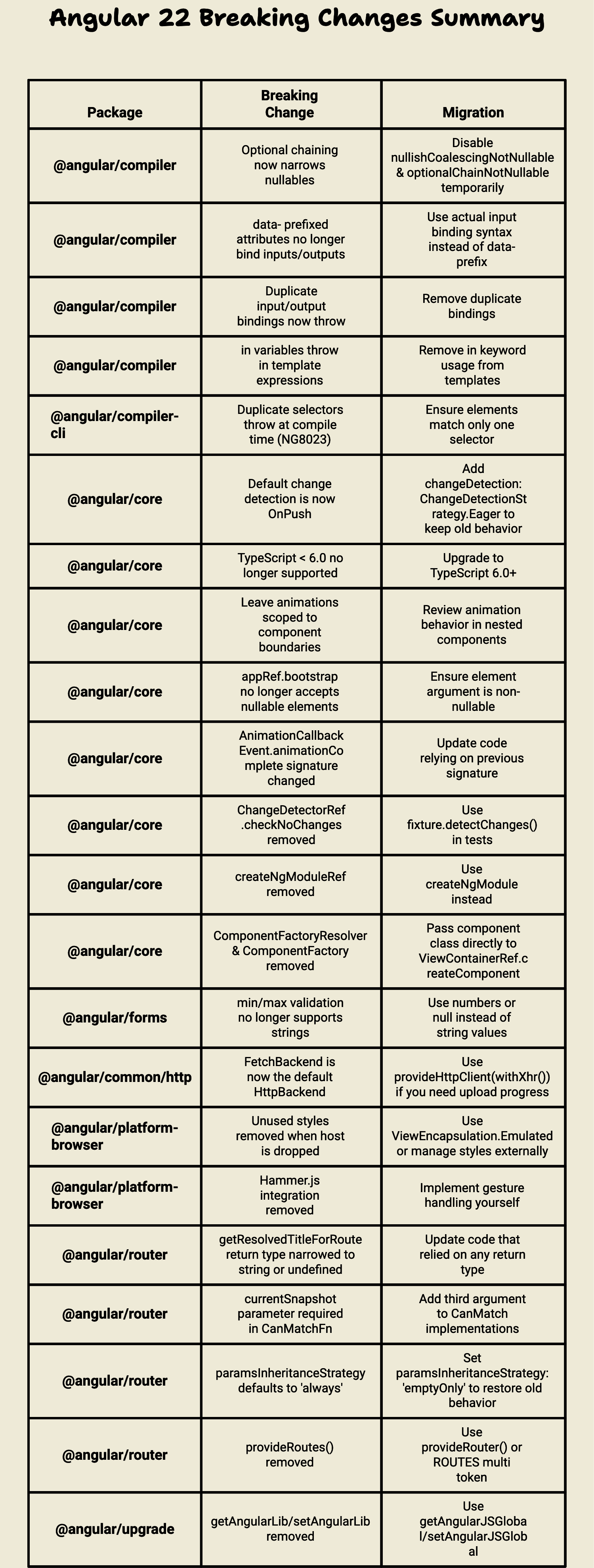
⚠️ Breaking Changes Summary
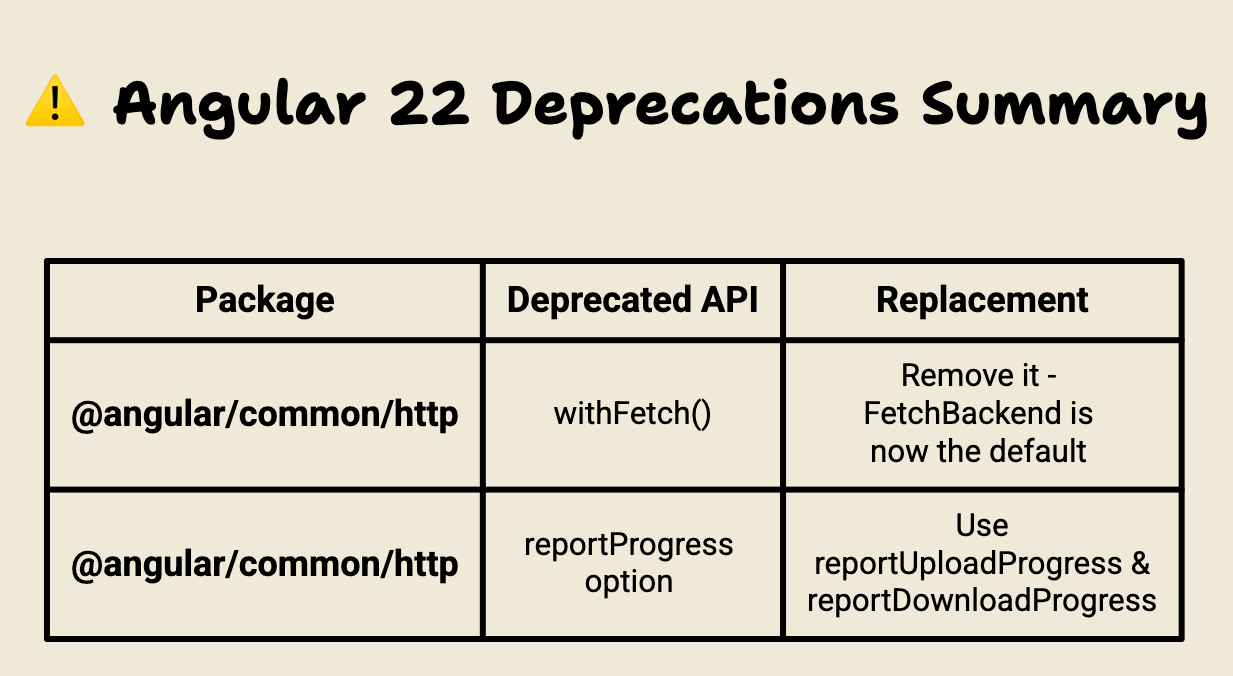
⚠️ Deprecations Summary
Thanks for reading so far 🙏
I’d like to have your feedback, so please leave a comment, clap or follow. 👏
Spread the Angular love! 💜
If you liked it, share it among your community, tech bros and whoever you want! 🚀👥
Don’t forget to follow me and stay in the loop: 📱
Thanks for being part of this Angular adventure! 👋😁